


A well-structured MarTech stack and effective marketing automation both depend on reliable data.
Before implementing workflows, lead scoring, segmentation, or automated campaigns, businesses need to understand the quality and structure of the information stored in their CRM.
When customer records contain duplicates, missing properties, inconsistent formats, or outdated information, automation can produce unreliable results. Leads may be assigned incorrectly, segmentation may become inaccurate, and marketing and sales teams may work with conflicting information.
These problems are particularly relevant for B2B organizations managing large contact databases, multiple marketing platforms, and complex customer journeys.
This is why a CRM data quality audit should be an important step before implementing or expanding marketing automation.
A CRM data quality audit is a structured assessment of the accuracy, completeness, consistency, uniqueness, and reliability of customer data. Its purpose is to identify problems that could affect marketing automation, CRM operations, reporting, and communication before new processes are deployed.
A proper audit helps organizations understand what data they have, how it is structured, where inconsistencies exist, and what needs to be corrected before automation begins.
In this guide, we explain how to conduct a CRM data quality audit, what to evaluate, which problems to prioritize, and how to prepare your CRM for a more reliable marketing automation environment.

Why Is a CRM Data Quality Audit Important Before Marketing Automation?
Implementing marketing automation without first reviewing CRM data can create operational problems that are difficult to identify later.
Automation follows the rules and information available to it. If the underlying data is inaccurate or incomplete, workflows may execute exactly as configured while producing incorrect outcomes.
Consider a B2B company preparing to launch a lead nurturing program.
Its CRM contains thousands of contacts, but some records have missing company information, duplicate email addresses, inconsistent lifecycle stages, and outdated lead statuses.
The company launches its automation workflows.
As a result:
- Contacts may enter the wrong nurturing sequences.
- Sales teams may receive duplicate lead notifications.
- Prospects may receive communications that are not relevant to their lifecycle stage.
- Lead scoring may rely on incomplete information.
- Reporting may count records inconsistently.
- Marketing and sales teams may disagree about which leads are qualified.
The problem is not necessarily the automation platform. It is the information and structure supporting the automation.
A data quality audit helps organizations identify these issues before they become embedded in automated processes.
It also provides an opportunity to establish consistent data definitions, ownership, and management procedures.
What Should a CRM Data Quality Audit Include?
A comprehensive CRM data quality audit should examine several dimensions of customer information.
The following six areas provide a practical starting point.
1. Data Accuracy
Data accuracy refers to whether the information stored in the CRM correctly represents the contact, company, or business relationship.
Examples of potential accuracy issues include:
- - Incorrect email addresses
- - Outdated job titles
- - Incorrect company information
- - Invalid phone numbers
- - Inaccurate country or location fields
- - Outdated customer or prospect statuses
Inaccurate information can affect segmentation, lead qualification, sales outreach, and reporting.
For example, if a contact's company information is incorrect, an account-based marketing campaign may associate that contact with the wrong organization.
What to review:
Check important CRM properties against reliable sources where appropriate. Identify outdated records, incorrect formats, and information that requires validation.
Not every property can be independently verified automatically, so organizations should establish which fields require manual review or confirmation from trusted systems.
2. Data Completeness
Data completeness measures whether records contain the information required to support business processes.
A CRM record may contain a name and email address but lack other information needed for segmentation, qualification, or sales routing.
Depending on the organization's processes, important fields may include:
- - Company name
- - Job title
- - Industry
- - Company size
- - Country or region
- - Lead source
- - Lifecycle stage
- - Lead status
- - Contact owner
- - Customer type
Missing information can prevent workflows from making the correct decisions.
For example, a lead qualification workflow may depend on company size and industry. If those properties are missing, the workflow may not be able to apply the intended qualification criteria.
What to review:
Identify which properties are essential for each automated process. Measure how many records contain the required information and determine where additional data collection or enrichment is necessary.
Avoid making every CRM property mandatory. Focus on the information that supports actual business decisions.
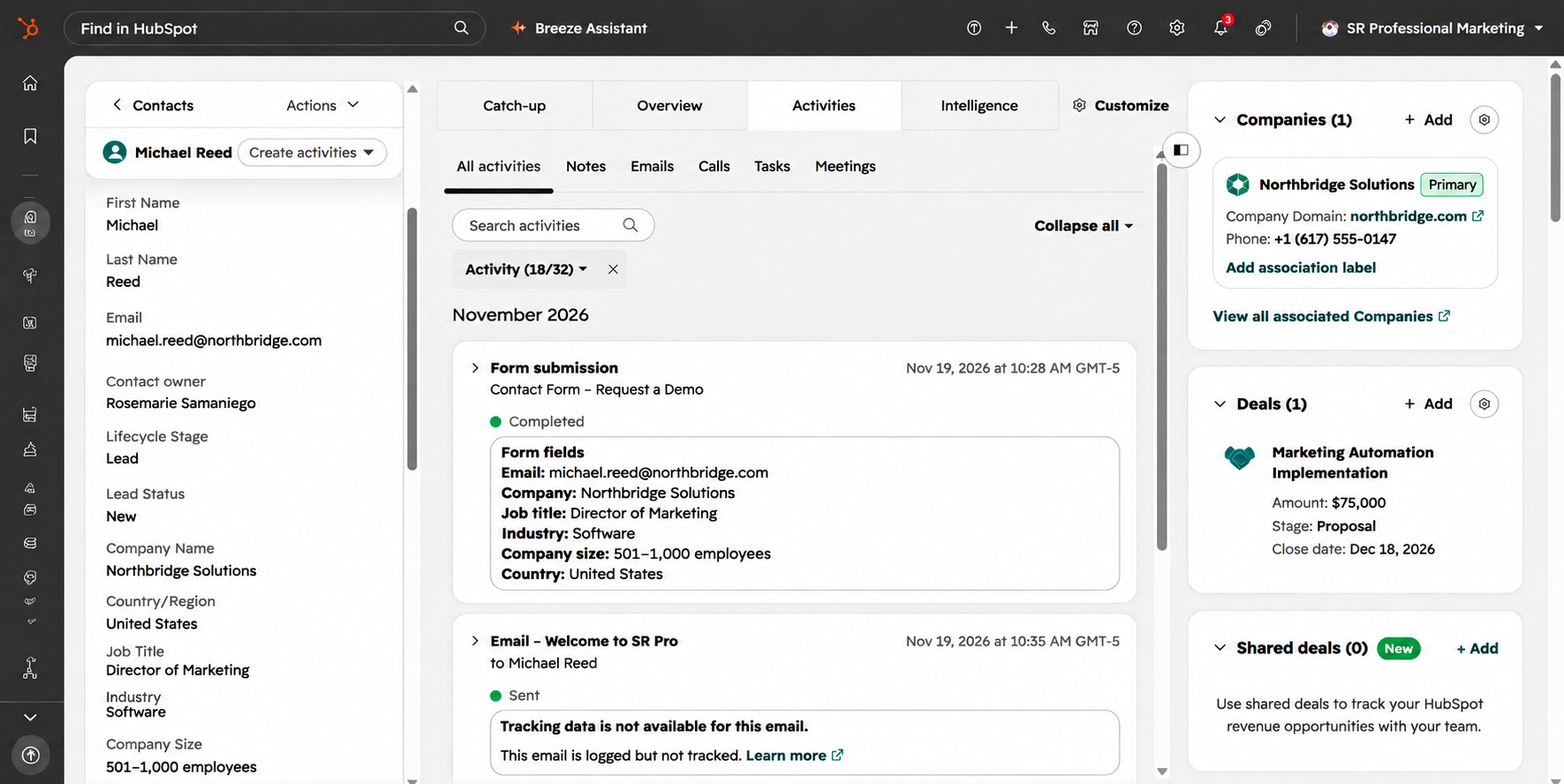
3. Duplicate Records
Duplicate records occur when the same contact or company appears multiple times in a CRM.
They can be created through different sources, including:
- - Multiple form submissions
- - Data imports
- - Manual record creation
- - Platform migrations
- - Integrations
- - Different naming or formatting conventions
Duplicates can create problems across the customer journey.
For example, two contact records belonging to the same person may have different owners, activity histories, lifecycle stages, or communication preferences.
This can make it difficult for sales and marketing teams to understand the complete relationship.
What to review:
Identify potential duplicate contacts and companies. Review the matching criteria, determine which records represent the same entity, and establish a controlled process for resolving them.
Importantly, records should not be merged based on superficial similarities alone. Two people can share a name, and two companies can have similar names without being the same organization.
HubSpot provides tools for identifying and managing duplicate records. Its automatic deduplication uses email addresses for contacts and company domain names for companies, while additional duplicate management capabilities depend on subscription and permissions.
Official reference: HubSpot. Review and Manage Duplicate Records
4. Data Consistency
Data consistency refers to whether information follows standardized definitions and formats across the CRM.
For example, the same industry might appear under several different values:
- - Information Technology
- - IT
- - Technology
- - Tech
Similarly, lead statuses may be defined differently across departments.
These inconsistencies make segmentation, automation, and reporting more complicated.
A workflow looking for contacts with the industry value "Information Technology" may not include records classified as "IT," even if they represent the same business category.
What to review:
Evaluate the properties used for segmentation, reporting, qualification, and automation.
Look for:
- - Inconsistent dropdown values
- - Different date formats
- - Inconsistent country names
- - Conflicting lifecycle stage definitions
- - Different naming conventions
- - Properties with overlapping purposes
- - Inconsistent terminology across departments
Standardizing these fields makes information easier to interpret and use across the organization.
5. Data Structure and Property Management
A CRM can contain accurate information and still have a poorly organized structure.
As companies grow, teams frequently create new properties, lists, fields, and custom objects to support different activities.
Over time, some properties become redundant, outdated, or difficult to understand.
For example, a company might have several properties describing lead status, but no clear documentation explaining which one should be used by marketing automation workflows.
This creates unnecessary complexity and makes system maintenance more difficult.
What to review:
Evaluate the overall CRM data structure, including:
- - Standard and custom properties
- -. Property definitions
- - Field types
- - Required fields
- - Object relationships
- - Property ownership
- - Unused or redundant properties
- - Dependencies between workflows and properties
The goal is to establish a data model that supports business processes without introducing unnecessary complexity.
6. Data Ownership and Governance
Data quality is not a one-time technical responsibility.
Marketing, sales, customer success, and operations teams may all create or update customer information.
Without clear ownership, different departments can introduce conflicting definitions, duplicate records, or inconsistent updates.
For example, marketing may define a qualified lead differently from sales. If both teams use the same CRM without agreed criteria, lifecycle reporting and automation can become unreliable.
What to review:
Establish clear responsibilities for:
- - Creating and updating records
- - Managing important CRM properties
- - Defining lifecycle stages
- - Approving changes to data structures
- - Monitoring data quality
- - Resolving duplicate records
- - Managing integrations
- - Maintaining documentation
Data governance helps organizations maintain consistent information as the CRM evolves.

How to Conduct a CRM Data Quality Audit Before Marketing Automation
A successful audit should follow a structured process. The objective is not simply to clean records but to determine whether the CRM is ready to support the intended marketing and operational processes.
Here are seven practical steps.
Step 1. Define the Business Objectives
Start by identifying what the organization wants to accomplish with marketing automation.
Different objectives require different data.
For example: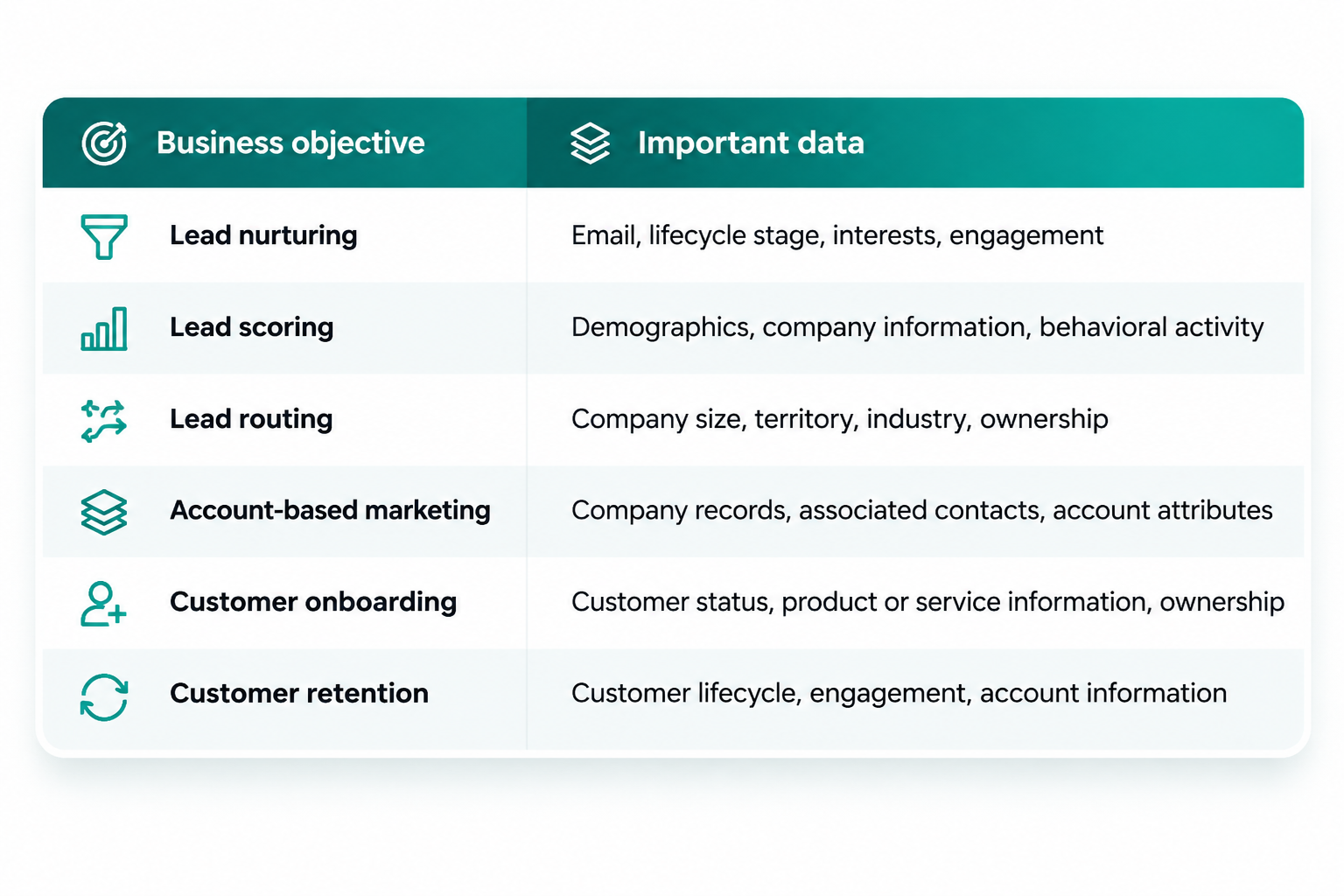 This step helps determine which properties and records require the most attention.
Without defined objectives, teams can spend time cleaning information that has little impact on the processes they actually need to automate.
Step 2. Inventory Your CRM Data
Review the objects, properties, records, and systems that make up your current CRM environment.
Identify:
- - Contact and company records
- - Deals and other relevant objects
- - Standard and custom properties
- - Data sources
- - Existing integrations
- - Imported databases
- - Active workflows
- - Lists and segmentation criteria
Document where information originates and how it enters the CRM.
This is particularly important for organizations using multiple platforms, because the same information may exist in different systems.
Step 3. Identify Data Quality Issues
Evaluate the data against the six dimensions discussed earlier:
- - Accuracy
- - Completeness
- - Uniqueness
- - Consistency
- - Structure
- - Ownership
Use CRM reports, available data quality tools, exports, and manual reviews to identify potential problems.
For HubSpot users, the Data Quality tools provide functionality for reviewing duplicates, formatting issues, property insights, and other aspects of CRM data management.
Depending on the subscription, additional capabilities may be available.
Step 4. Review Lifecycle Stages and Lead Management
Lifecycle stages and lead statuses are particularly important for marketing automation.
They help determine how contacts move through marketing and sales processes.
Review whether:
- - Lifecycle stages are clearly defined.
- - Marketing and sales agree on qualification criteria.
- - Lead ownership is assigned consistently.
- - Contacts move between stages according to documented rules.
- - Automated workflows use the correct properties.
- - Customer records are handled appropriately.
For example, if a workflow is designed to nurture marketing-qualified leads, the organization needs a consistent definition of what qualifies as an MQL.
Otherwise, the automation may include contacts that should not receive that communication.
Step 5. Clean and Standardize the Data
Once issues have been identified, create a remediation plan.
This may involve:
- - Resolving confirmed duplicate records
- - Correcting formatting issues
- - Standardizing property values
- - Reviewing incomplete records
- - Removing obsolete or unnecessary data where appropriate
- - Updating lifecycle definitions
- - Correcting property mappings
- - Establishing consistent naming conventions
Changes should be reviewed before implementation, especially when records are associated with workflows, reporting, or integrations.
For large databases, organizations should also consider how data changes affect connected systems.
Step 6. Validate Integrations and Data Synchronization
If the CRM connects to other platforms, review how information moves between them.
Check:
- - Which platform owns each field.
- - Which properties are synchronized.
- - Whether synchronization is one-way or bidirectional.
- - How conflicting updates are handled.
- - Whether records are associated correctly.
- - How integration errors are identified.
- - Whether duplicate records can be created during synchronization.
A CRM can be clean internally while still receiving inconsistent information from external systems.
This is why integration validation is an essential part of preparing for marketing automation.
Step 7. Document Standards and Establish Ongoing Monitoring
Before launching automation, document the approved data structure and management rules.
Include:
- - Property definitions
- - Lifecycle stage criteria
- - Lead qualification rules
- - Record ownership
- - Data entry standards
- - Integration responsibilities
- - Duplicate management procedures
- - Data quality review schedules
Assign ownership for maintaining these standards.
The audit should establish a foundation that can be maintained over time, not simply produce a temporary cleanup.
How to Measure CRM Data Quality

A CRM data quality audit should produce measurable findings.
Rather than relying on subjective assessments, organizations can evaluate specific indicators to understand the condition of their database.
The following metrics can help:
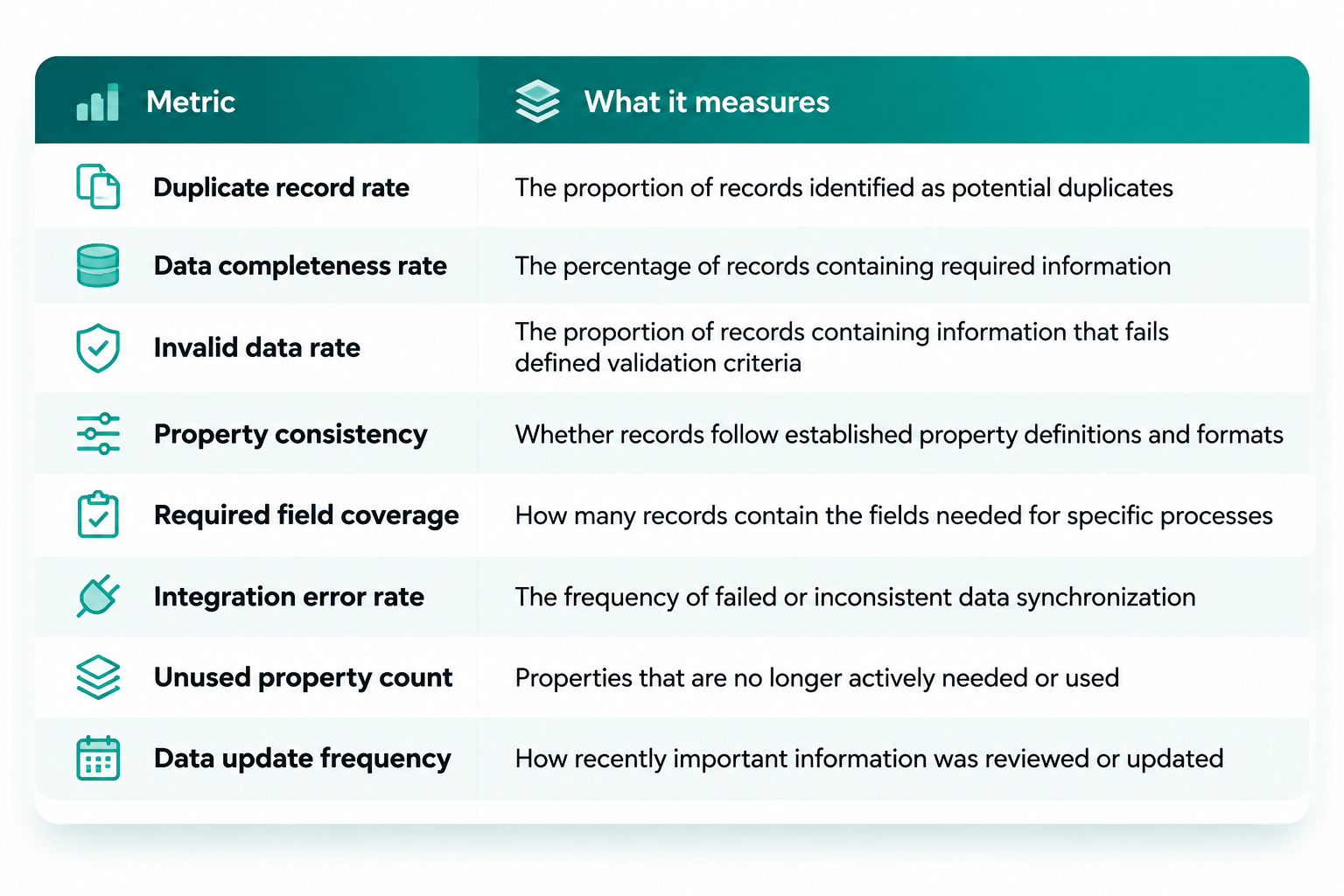
For example, an organization might discover that a significant portion of its lead records is missing company size information.
If company size is required for lead qualification or routing, this becomes a clear remediation priority.
A useful audit should document:
- The current condition.
- The business processes affected.
- The level of risk or operational impact.
- The recommended corrective action.
- The responsible team.
- The criteria for validating the improvement.
The exact metrics and thresholds should reflect the organization's business model and data requirements. There is no universal data quality score that applies to every CRM.
When Should You Conduct a CRM Data Quality Audit?
A CRM data quality audit is particularly useful before significant changes to your marketing or revenue technology environment.
Consider conducting one when:
- - Implementing a new CRM.
- - Migrating from one platform to another.
- - Launching a new marketing automation program.
- - Expanding lead scoring and qualification.
- - Integrating additional business systems.
- - Consolidating multiple contact databases.
- - Redesigning lifecycle stages.
- - Preparing for account-based marketing.
- - Investigating inconsistent CRM reporting.
- - Scaling marketing and sales operations.
An audit can also be valuable when an existing CRM has accumulated years of custom properties, workflows, imports, and integrations without a consistent data management process.
The earlier organizations identify these issues, the easier it is to address them before they affect additional processes.
How SR PRO Helps Companies Improve CRM Data Quality
At SR Pro, we help companies implement, optimize, and manage the technology behind their marketing and revenue operations.
Our work includes HubSpot onboarding and ongoing support, Marketo services, CRM configuration, marketing automation, data migration, and integration support.
Data quality is an important part of this work because automated processes depend on reliable information and properly configured systems.
Depending on the organization's requirements, our support can include:
CRM Configuration and Optimization
Reviewing CRM properties, pipelines, lifecycle stages, lead management processes, and other configurations to better align the platform with business requirements.
Data Migration and Preparation
Supporting data migration, field mapping, imports, and data preparation as part of CRM implementation and optimization projects.
Duplicate Management and Data Cleanup
Helping organizations identify data inconsistencies, review duplicate records, and improve the structure of their CRM information.
Marketing Automation Configuration
Designing and optimizing workflows, lead scoring, segmentation, nurturing, and other automated processes based on the organization's data and operational requirements.
Platform Integrations
Supporting connections between CRM, marketing automation, and other business applications so that relevant information can move between systems.
Custom Solutions and Development
Developing tailored applications, integrations, and custom functionality to extend HubSpot's capabilities and address specific business requirements that standard features cannot fully support.
Ongoing Technical Support
Helping teams maintain and improve their CRM environments as processes, requirements, and technology needs evolve.
Our HubSpot onboarding services include implementation options with data migration, custom properties, integrations, and workflow configuration depending on the selected scope.
For organizations already using HubSpot, our ongoing support includes CRM optimization, data import with field mapping and validation, workflow improvements, and reporting support.
We also provide Marketo onboarding and ongoing support for organizations that need help managing and optimizing their marketing automation environments.
Learn more about our:
- HubSpot Onboarding Services
- HubSpot Ongoing Support
- Marketo Services
-
Conclusion: Build a Reliable Data Foundation Before Automating
Marketing automation is only as reliable as the data and processes supporting it.
Before implementing new workflows, expanding lead scoring, or connecting additional platforms, organizations should understand the condition of their CRM data and identify the issues that could affect their operations.
A structured CRM data quality audit helps businesses identify duplicates, correct inconsistencies, improve data completeness, standardize properties, and establish clear ownership.
More importantly, it allows organizations to prepare their technology environment around actual business requirements rather than building automation on top of an unreliable foundation.
If your company is preparing for a CRM implementation, planning a marketing automation project, or struggling with inconsistent customer data, SR Pro can help you evaluate your current environment and improve the systems behind your marketing and revenue operations.
-
Explore SR Pro's HubSpot and Marketo Services or connect with our team.