

Imagine a business on the edge of real growth, but stuck in a loop of missed opportunities and delayed decisions. Now picture that same business gaining momentum because every dashboard insight turns into a clear next step.
Most teams already have the data, but many still struggle to turn CRM analytics into actions that improve pipeline and revenue. It’s a common scenario: you clean up your CRM, organize fields, build a solid dashboard, and still see flat pipeline growth or inconsistent sales results. That’s because the dashboard is only the starting point.
Real growth comes when insights lead to better decisions, tighter follow-up, smarter campaigns, and automation that makes execution consistent. In this guide, you’ll learn how to focus on the metrics that matter, spot meaningful patterns, and turn CRM insights into repeatable workflows that drive results.
CRM Analytics vs. CRM Reporting: The Mindset Shift
Before you can turn CRM data into growth, it helps to understand the difference between simply reporting numbers and using analytics to guide action.
CRM reporting shows you what happened, like how many leads came in or how pipeline changed. CRM analytics goes a step further by explaining why those results happened and what you should do next to improve them.
That difference matters because a dashboard on its own doesn’t create growth. A pipeline chart might look good in a meeting, but if no one adjusts the process, messaging, or follow-up, revenue won’t move.
To be truly useful, CRM insights should answer three questions: what changed, why it changed, and what you should do in the next 7 to 30 days.
A practical way to approach this is to start by spotting what stands out in the data, digging into the cause, choosing a clear next step, putting it into action, and then checking results to see what worked. This keeps CRM analytics focused on progress, not just tracking numbers.
The Dashboards That Actually Drive Revenue (Not Vanity Metrics)
Not every CRM dashboard helps you grow. It’s easy to track surface-level numbers like total leads or email opens, but those metrics don’t always reflect real pipeline and revenue. The dashboards that matter most are the ones that show what’s moving deals forward, where the funnel is leaking, and what needs to change next.
Pipeline Health Dashboard (Revenue Predictability)
This dashboard shows whether your funnel is healthy and whether your pipeline can realistically turn into revenue. It’s essential for forecasting and spotting where leads or opportunities get stuck.
Track metrics like lead-to-MQL, MQL-to-SQL, SQL-to-opportunity, win rate by source or segment, median sales cycle length, pipeline coverage, and deal size or deal velocity. When these numbers drop, they usually point to a clear issue. Early-stage conversion problems often mean lead quality or qualification needs work. Late-stage problems, like declining win rates, usually signal gaps in sales execution, positioning, or pricing.
A quick way to read it is by comparing stages. If SQL volume looks strong but opportunities stay low, the handoff or qualification process may be breaking down. If opportunities look healthy but win rates are falling, the focus should shift to how deals are being handled.
Marketing Quality Dashboard (Acquisition Efficiency)
Marketing quality dashboard helps you see whether marketing is creating real sales opportunities or just generating activity that doesn’t convert.
Look at conversion rates by source, lead response time, engagement trends by lifecycle stage, and performance over recent time periods. These insights help you identify which channels consistently produce qualified pipeline, which campaigns attract attention but don’t move prospects forward, and whether lead quality is improving or slipping over time.
The goal is to move from asking, “Which channel brings in the most leads?” to “Which channel creates opportunities and revenue?”
Sales Execution Dashboard (Follow-Up + Process Control)
This dashboard shows whether pipeline is slowing down because leads aren’t being handled fast enough, or because deals aren’t progressing smoothly through the sales process.
Track speed-to-lead, follow-up consistency, drop-off reasons by stage, and activity-to-outcome ratios like calls or emails needed to book meetings. These metrics reveal whether the issue is marketing quality, sales execution, or a process gap causing deals to stall. Even strong leads can go cold when response times are slow or follow-up is inconsistent, and this dashboard helps you catch those revenue leaks early.
Together, these three dashboards give you a clear view of what’s really driving results, from lead quality to pipeline movement to sales follow-through. Once you can trust what the numbers are telling you, the next step is knowing how to read the signals behind them.
How to Interpret CRM Patterns (Turning Signals Into Meaning)
CRM numbers become valuable when you treat them as signals, not just stats on a dashboard. The goal isn’t to constantly monitor metrics, but to notice what’s changing, understand what’s driving it, and take targeted action based on what the data is telling you.
With that in mind, here are five of the most common CRM insight patterns to watch for, along with what they typically mean:
- 1. Lead volume up, pipeline down
This usually points to lead quality issues, lead leakage, or routing and follow-up failures. It can also mean your targeting is too broad and attracting the wrong audience.
- 2. Strong MQL numbers, weak SQL conversion
This suggests misaligned qualification criteria or unclear handoff rules between marketing and sales. Marketing might be scoring engagement too highly while sales needs stronger intent or fit.
- 3. Pipeline strong, win rate dropping
This often means deals are being created, but the strategy to close them is weak. Common causes include competitor pressure, pricing mismatch, poor discovery, or unclear deal exit criteria.
- 4. Shorter sales cycle but lower ACV
This can indicate you’re closing easier deals faster but missing larger opportunities. It may be a sign that your mid-market or enterprise motion needs better targeting, messaging, or nurturing.
- 5. High close rate but low pipeline coverage
This is usually a pipeline risk problem. You may be over-relying on referrals, a few channels, or a limited set of accounts. It works until it doesn’t.
Use Segmentation to Avoid Wrong Decisions
One of the most common mistakes teams make is relying too heavily on overall averages. An average conversion rate might look healthy at first glance, but it can easily hide what’s really happening underneath. For example, a 10% conversion rate could mean one channel is converting at 25% while another is struggling at 2%. If you don’t break the data down, you risk investing in the wrong areas and missing the real growth opportunities.
That’s why segmentation matters. It helps you pinpoint what’s working, what’s underperforming, and where improvements will have the biggest impact. In most CRMs, it’s worth segmenting insights by lead source, industry, deal size or product tier, region, persona, and lifecycle stage.
A simple way to think about it is this: averages can hide problems, but segmentation shows the truth.
Turn CRM Insights Into Growth: A Step-by-Step Action Framework
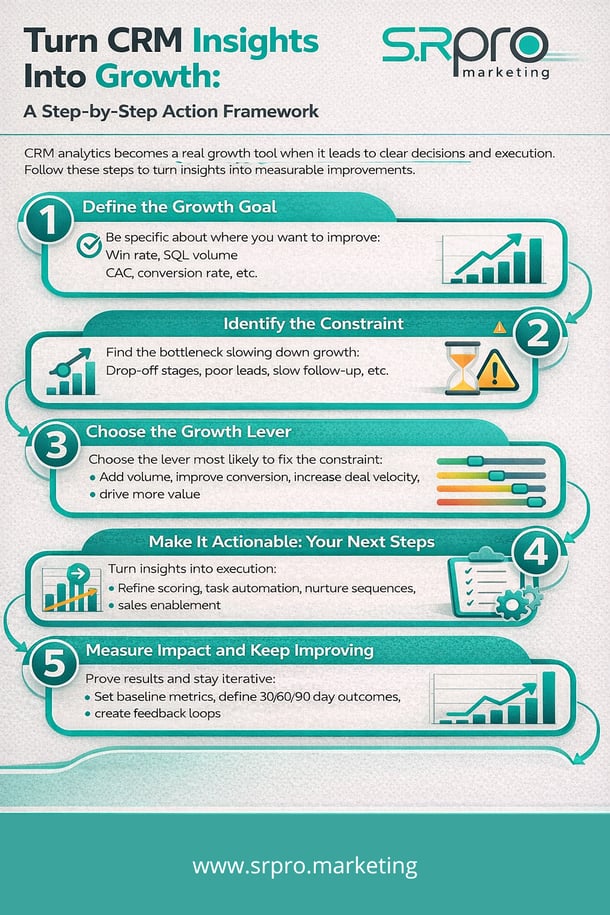
CRM analytics becomes a real growth tool when it leads to clear decisions and consistent execution. Instead of reviewing dashboards and moving on, teams need a repeatable way to translate insights into changes that improve pipeline, revenue, and efficiency. The framework below helps you move from “we see the problem” to “we fixed it and measured the impact.”
Step 1: Define the Growth Goal
Start by getting clear on what you’re optimizing for. That could mean improving win rate to increase revenue, generating more sales-qualified leads to grow pipeline, or improving conversion to lower costs and increase efficiency. Growth happens faster when the goal is specific, measurable, and tied to a single outcome the team can rally around.
Step 2: Identify the Constraint
Next, pinpoint where performance is breaking down. It might be a drop-off between stages, slow follow-up times, low-quality leads from certain channels, or a weak meeting rate. This constraint becomes your focus. Instead of trying to fix everything at once, target the one bottleneck that’s limiting the entire funnel.
Step 3: Choose the Growth Lever
Once you know what’s holding results back, choose the lever most likely to improve performance quickly. You may need more volume through better lead generation, stronger conversion through improved qualification and nurturing, more velocity through faster routing and cleaner processes, or more value through packaging and upsell strategy. Your dashboards should help you identify which lever will deliver the biggest impact right now.
Step 4: Make It Actionable: Your Next Steps
This is where insights turn into execution. Practical actions often include refining lifecycle definitions and lead scoring, routing leads based on intent and fit, building stage-based nurture sequences, adding alerts for stuck deals and task automation, improving attribution and source tracking, and creating sales enablement for top-performing segments. The goal is to turn insights into workflows, not just discussion points.
Step 5: Measure Impact and Keep Improving
To prove results and scale what works, set baseline metrics before changes, define expected outcomes over the next 30, 60, or 90 days, and create feedback loops between Sales and Marketing. The strongest CRM strategies aren’t one-time fixes. They evolve as your data improves and your team learns what drives the best outcomes.
Real Examples of CRM Analytics Turning into Revenue Actions
The best CRM strategies are practical and repeatable. Here are three examples of how teams can turn insights into measurable revenue improvements.
Example #1: Slow Lead Response Is Hurting Conversions
If inbound leads aren’t contacted within 24 hours, intent drops fast. Fix this by automating lead routing, sending Slack or email alerts, using round-robin assignment, and tracking a first-touch SLA. This often increases meeting rates and improves MQL-to-SQL conversion.
Example #2: High Engagement, Low Opportunity Creation
If leads open emails but don’t book meetings, the issue is usually CTA and follow-up alignment. Update CTAs by lifecycle stage, add booking links, and trigger intent-based follow-ups for high-engagement contacts. This typically lifts MQL-to-SQL conversion.
Example #3: Steady Pipeline, Dropping Win Rate
If opportunities are stable but win rate declines, focus on deal execution. Review loss reasons by segment, tighten stage exit criteria, and improve competitor and objection enablement. This leads to stronger win rates and more accurate forecasting.
Turning CRM Insights Into Automation
This is where growth starts to compound. When you turn insights into automation, you remove guesswork and manual effort, and your team can execute faster and more consistently at scale.
Automations That Operationalize Insights
One of the biggest advantages of automation is that it helps your best practices happen every time, not just when someone remembers to follow up. High-impact examples include:
- Lead scoring and qualification workflows
- Smart lifecycle movement rules
- Pipeline stage-based nurture campaigns
- Lead routing and SLA notifications
- Re-engagement flows for inactive opportunities
- Attribution-based budget optimization
Each of these automations connects directly to revenue by improving speed, conversion, and pipeline quality.
The Always-On Monitoring Setup
To make CRM analytics sustainable, it’s also important to set up ongoing monitoring. A simple weekly dashboard review cadence keeps teams aligned, while automated alerts can flag sudden spikes, drops, or delays before they become bigger problems. Shared reporting across Marketing, Sales, and RevOps ensures everyone works from the same numbers, and documented definitions for lifecycle stages and key metrics prevent confusion over what each report actually means.
With these foundations in place, your CRM becomes more than a reporting tool. It becomes a system that continuously supports better execution and better results.
Common Mistakes That Stop CRM Analytics From Driving Growth
Even well-built dashboards can fall short when the underlying process isn’t strong. Here are the most common mistakes that prevent CRM analytics from translating into real revenue impact:
- Tracking volume without quality
Focusing on lead count instead of conversion, pipeline, and opportunity quality leads to “busy” metrics with weak results. - Unclear lifecycle stages and definitions
If your team isn’t aligned on what counts as an MQL, SQL, or Opportunity, reports become inconsistent and hard to trust. - Poor Marketing-to-Sales handoff
Leads often get delayed or dropped when ownership rules, routing, or follow-up expectations aren’t clearly defined. - Measuring activities instead of outcomes
Emails sent and calls made don’t matter unless they lead to meetings, opportunities, and closed deals. - Ignoring segmentation and cohort trends
Looking only at overall averages hides what’s working by channel, persona, deal size, or time period. - Relying on manual review with no alerts or automation
When insights depend on someone “checking the dashboard,” problems are noticed too late and performance stays inconsistent. - Attribution gaps and “unknown source” data
Missing or inaccurate source tracking makes it difficult to invest in the right channels and scale what’s working.
Most of these issues don’t require new tools. They require clearer definitions, better alignment, and operational workflows that turn insights into action.
A Simple 30-Day CRM-to-Growth Action Plan
If you want to turn CRM insights into real results quickly, a focused 30-day plan helps you move from analysis to execution without getting stuck in endless cleanup work.
- Week 1: Establish truth and alignment
Confirm your key definitions (lifecycle stages, required fields, source rules), validate that pipeline reporting is accurate, and pinpoint one or two bottlenecks that are holding growth back. - Week 2: Fix the biggest leakage point
Implement clear lead routing rules and SLA tracking, tighten lead scoring and qualification logic, and close any attribution gaps so you can trust the data behind your decisions. - Week 3: Launch revenue-driving experiments
Build stage-based nurture or reactivation workflows, create targeted messaging and offers by segment, and improve sales sequences based on persona and lead source. - Week 4: Review and optimize
Compare results against your baseline, document what worked and what didn’t, and scale the improvements that drove impact while removing anything that isn’t moving the needle.
With this approach, your team can stay focused on measurable progress, not just better reports.
Conclusion: CRM Analytics Only Matters When It Changes Behavior
CRM analytics isn’t meant to live inside dashboards. It’s meant to shape decisions, improve execution, and create measurable movement in your pipeline.
A clean CRM gives you the foundation, but growth happens when teams turn insights into action, stay aligned across Marketing and Sales, automate what works, and continuously improve based on results.
If your reports look strong but revenue still isn’t moving, your workflows may be the missing link. SR Pro Marketing helps teams turn CRM insights into automation and revenue-driving execution, not just better dashboards. Get in touch today to build a smarter, more scalable growth engine.